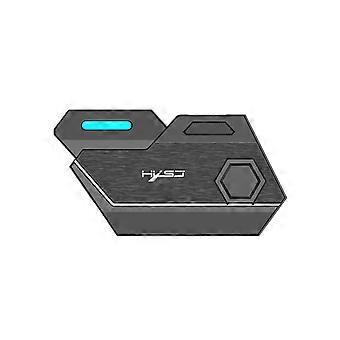
USB adapter, plug and play, mobile game adapter, controller game keyboard and mouse converter

₱2,249.00
FREE Shipping

USB adapter, plug and play, mobile game adapter, controller game keyboard and mouse converter

  • Brand: Unbranded

USB adapter, plug and play, mobile game adapter, controller game keyboard and mouse converter

  • Brand: Unbranded
RRP: ₱3,349.00
Price: ₱2,249.00
You save: ₱1,100.00 (32%)
Sold by:
₱2,249.00
FREE Shipping

In stock

14-Day Returns Policy

Payment methods:

Description

USB adapter, plug and play, mobile game adapter, controller game keyboard and mouse converter

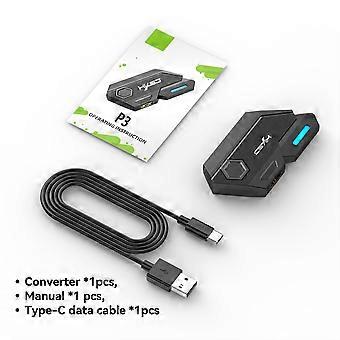
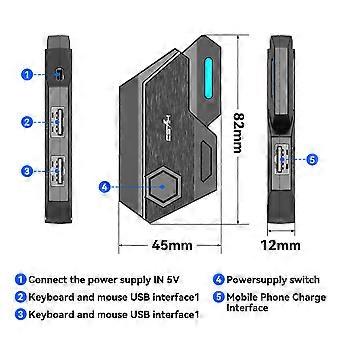
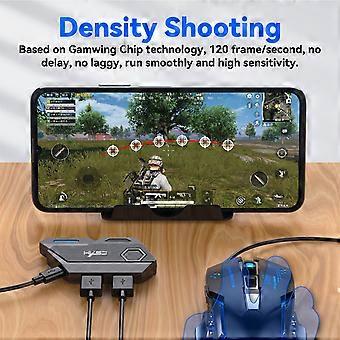
Product Introduction: Wired interface: USB Number of interfaces: 4PCS Data cable length: 80cm Data cable interface: TYPE-C Adaptation system: Android 6 or above Product weight: 21g Product size: 82*45*12MM P3 throne * 1 80cm TYPE-C Data Cable*1 User English manual*1 How to use: USAGE ON ANDROID DEVICES Step1: Scan the below QR code todownload "Geekgamer" app Step2: open "Geekgamer" app after installation Step3: Allow Usage Information access step4: Allow "Geekgamer" to drawover other apps (get floating window) Step5: Back to geekgamer homepage, clickDevice disconnectR to connect bluetooth Step6: Press "" Ctrl+ F1" combo button on yourkeyboard to shift android wireless mode (theLED indicator on Mix SE flashes in blue).clickMix Se-a-xx"to connect.(After connection,the led indicator on Mix SE lights in blue andDevice disconnect" will change to "Deviceconnected" in the geekgamer homepage.) Step7: Back to Geekgamer homepage to add game. Step8: Select the game you want to play from the list,PUBG Mobile for example. Step9: Back to the homepage to enter the game. Step10: Tap the floating icon on the upper left corner after entering the game. Step11: click "select . Step12: Choose PUBG Nomal keyboardclick "Active Config" and enjoy your game. Only support IOS system operation instructions below 13.4: Step1: Open the App Store Step2: Search and download "geekgamer" Step3: Open the Geekgamer app, click"Device disconnect" to settings to connect bluetooth. Step4: Press " Ctrl+ F2" combo button on yourkeyboard to shift ios wireless mode (the LEDindicator on Mix SE flashes in green).click "Mixse-i-xX" to connect. (After connection, the ledindicator on Mix SE lights in green and "Device disconnect" will change to "Device Connected" in the geekgamer homepage.) Step5: Back to Geekgamer homepage to add game. Step6: Click add to Select the game thatyou want to play from the list,PUBG MOBILE for Example. Step7: Click "Enter"to choose configurations. Step8: Choose preset defaultconfigurations and apply it. Step9: Back to your iPhone/iPadhomepage and open the original game and enjoy your game.
  • Fruugo ID: 135796020-286483988
  • EAN: 7847108621064

Product Safety Information

Please see the product safety information specific to this product outlined below

The following information is provided by the independent third-party retailer selling this product.

Product Safety Labels

CE Mark
Safety Warnings: This product requires special attention to safety when used. For children, it should be used under adult supervision to ensure their safety. At the same time, if the product is suitable for pets, please make sure that the pets are not exposed to it under adult supervision to avoid unnecessary harm. When not in use, please store it properly and keep it out of the reach of children and pets.
Ingredients: Practical

Delivery & Returns

Dispatched within 3 days

  • STANDARD: FREE - Delivery between Mon 26 January 2026–Tue 03 February 2026 - FREE

Shipping from China.

We do our best to ensure that the products that you order are delivered to you in full and according to your specifications. However, should you receive an incomplete order, or items different from the ones you ordered, or there is some other reason why you are not satisfied with the order, you may return the order, or any products included in the order, and receive a full refund for the items. View full return policy

Product Compliance Details

Please see the compliance information specific to this product outlined below.

The following information is provided by the independent third-party retailer selling this product.

Manufacturer
The following information outlines the contact details for the manufacturer of the relevant product sold on Fruugo.

  • Shenzhen Xinyichuang Technology
  • Shenzhen Xinyichuang Technology
  • MaAnTang Community, Bantian Street, Longgang District 515, Building B, Getalong Complex, No.227 Bulong Road
  • Ma'antang Community, Bantian Street, Longgang District
  • Shenzhen
  • CN
  • 518000
  • yxmylsq2@outlook.com
  • 17093405918

Responsible Person in the EU
The following information outlines the contact information for the responsible person in the EU. The responsible person is the designated economic operator based in the EU who is responsible for the compliance obligations relating to the relevant product sold into the European Union.

  • E-CrossStu GmbH
  • E-CrossStu GmbH
  • 69 Mainzer Landstrasse
  • Frankfurt am Main
  • DE
  • 60329
  • E-crossstu@web.de
  • 4969332967674